Skip to content
Material Design 1
Main Navigation
v3
v2
v1

English

简体中文
繁體中文
Español
Français
Русский
Português – Brasil
Deutsch
日本語
한국어
Italiano
Polski
Türkçe
čeština
magyar

English

简体中文
繁體中文
Español
Français
Русский
Português – Brasil
Deutsch
日本語
한국어
Italiano
Polski
Türkçe
čeština
magyar

Appearance

Sidebar Navigation

Material Design

Environment

Material properties

Elevation & shadows

What's new

Motion

Material motion

Duration & easing

Movement

Transforming material

Choreography

Creative customization

Style

Color

Icons

Imagery

Typography

Writing

Layout

Principles

Units & measurements

Metrics & keylines

Structure

Responsive UI

Split screen

Components

Bottom navigation

Bottom sheets

Buttons

Buttons: Floating Action Button

Cards

Chips

Data tables

Dialogs

Dividers

Expansion panels

Grid lists

Lists

Lists: Controls

Menus

Pickers

Progress & activity

Selection controls

Sliders

Snackbars & toasts

Steppers

Subheaders

Tabs

Text fields

Toolbars

Tooltips

Widgets

Patterns

Confirmation & acknowledgement

Data formats

Empty states

Errors

Fingerprint

Gestures

Help & feedback

Launch screens

Loading images

Navigation

Navigation drawer

Navigational transitions

Notifications

Offline states

Permissions

Scrolling techniques

Search

Selection

Settings

Swipe to refresh

Growth & communications

Introduction

Onboarding

Feature discovery

Gesture education

Usability

Accessibility

Bidirectionality

Platforms

Platform adaptation

Android

Resources

Color palettes

Devices

Layout templates

Roboto & Noto fonts

Sticker sheets & icons

Shadows

On this page

Movement ​

Material in motion abides by forces similar to those of the real world, like gravity.

On-screen movement

Arc upward

Arc downward


In-and-out screen movement

Independent movement

Relative movement
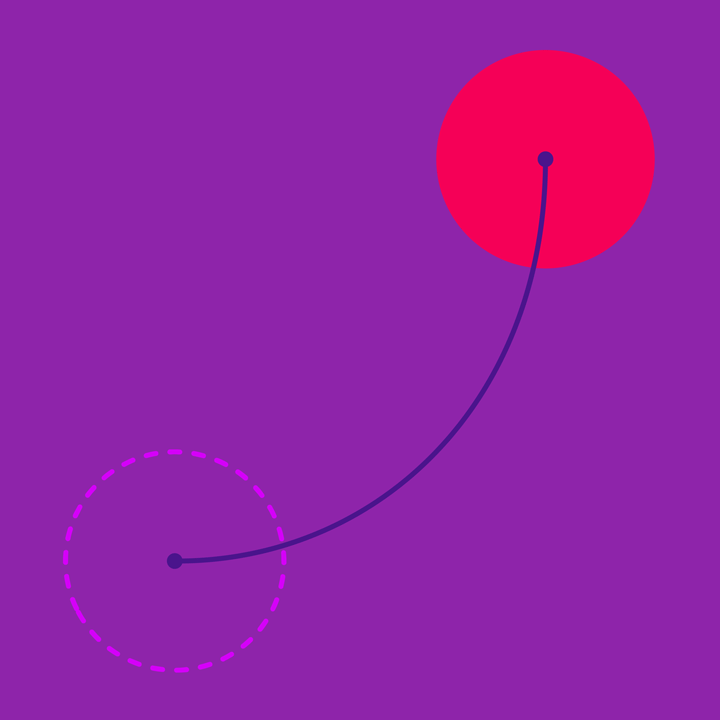
Material Design: on-screen and in-and-out screen movement patterns

Movement within screen bounds ​

The movement of an element between two points within the bounds of the screen follows a natural, concave arc. All on-screen movements use the standard curve.

Arc upward

Rising against gravity in the real world requires effort. Elements moving upward on the screen should similarly depict effort during acceleration through a slower upward movement.

Do.

When moving diagonally upward, begin with a shallow ascent and end with a steep ascent.

Don't.

Don't start an element's upward movement with a steep ascent.

Arc downward

Falling elements in the real world are accelerated by gravity. Elements moving downward on screen should depict less effort through a faster downward movement.

Do.

When moving diagonally downward, descent should begin steeply and end shallowly.

Don't.

Don't start an element's downward movement with a shallow descent.

When not to arc

Elements moving along a single axis (either horizontally or vertically, but not both) do not follow an arc. These movements are simpler and may move at a slightly faster speed.

Do.

Keep the path for single-axis movement straight.

Don't.

Don't apply an unnatural arc to single-axis movement.

Elements entering and exiting the screen also move along a single axis.

Do.

Linear entrances are easy to follow with a clearly defined entry point.

Don't.

Don't arc the path of an element if it is moving off-screen, as it complicates the entry point.

Movement in and out of screen bounds ​

Independent movement ​

Elements entering and exiting the screen are referred to as independent elements as they don't affect the position of other on-screen content.

Entering the screen

Elements entering the screen use the deceleration curve for a speedy entrance, indicating that they had been travelling at peak velocity.

Permanently leaving the screen

Elements permanently leaving the screen use the acceleration curve to speed off-screen over a slightly shorter duration, as they will not be returning and require less user focus.

Do.

Apply the deceleration curve to items entering the screen that do not affect the position of any other elements around it. On mobile, this transition typically occurs over 225ms. Apply the acceleration curve to these same items when they permanently leave the screen. On mobile, this transition typically occurs over 195ms.

Don't.

Don't use the standard curve for either these cases. For entrances, slow acceleration is unnecessary as focus should be on the final resting point. For exits, slow deceleration is unnecessary as the ending point isn't visible.

Temporarily leaving the screen

Elements temporarily leaving the screen should use the sharp curve, as they may return to the screen at any time and should appear nearby and within reach.

Do.

Apply the sharp curve to items temporarily leaving the screen that may return from the same exit point. When they return, use the deceleration curve. On mobile, this transition typically occurs over 300ms.

Don't.

Apply the acceleration curve to items permanently leaving the screen, or if they are to return from a different location. If they return, use the deceleration curve.

Relative movement ​

Entering or exiting elements that move other on-screen elements do so along a smooth easing curve, so that they remain minimally disruptive and avoid eye-catching, dramatic movement.

The standard curve is used for moving elements both in and out of the bounds of the screen. This curve has a slightly longer duration compared to independent elements.

Do.

Since the on-screen floating action button's movement is influenced by the entering card, the standard curve is applied to the movement of both elements to maintain a smooth start and stop. On mobile, this transition typically occurs over 300ms.

Don't.

Using deceleration and acceleration curves for the upward and downward movement cause the on-screen floating action button to abruptly start moving upward and abruptly stop moving downward. This movement is harsh and disruptive.
Pager
Previous pageDuration & easing
Next pageTransforming material

Released under the Apache-2.0

Copyright © 2014-Present Google

https://m1.material.io/motion/movement.html

Released under the Apache-2.0

Copyright © 2014-Present Google